
What is Dr. Felix?
Dr. Felix is a diagnostic tool that helps Customer Support determine what is causing your issue.
Note: You can navigate to each section by clicking the link below:
- When should I run Dr. Felix?
- How do I run Dr. Felix? (PC)
- How do I run Dr. Felix (Mac)
- How do I attach my results?
- What information does Dr. Felix collect?
When Should I Run Dr. Felix?
Please run Dr. Felix if you experience one of the following issues with a PC or Mac game:
- Game crashes or freezes
- Game won't open
- Game does not display correctly
- Game is unable to download, install, or activate
- An error message appears in the game
- An error code appears in the Big Fish Games app (Game Manager)
How Do I Run Dr. Felix? (PC)
- Click here to download Dr. Felix for PC.
- Select Run or Save File when prompted. If you choose Run, the program will start as soon as it downloads. If you choose to Save, you will have to manually run the program file after it has downloaded to your computer.
- Once the program starts, it will display the Terms and Conditions.
-
Click Agree, and Dr. Felix will start gathering information. Please note the green progress bar, as it may take a minute or two to finish.
- When Dr. Felix is finished, click the Close button.
-
A .zip file named DrFelixResults will be created and saved to your desktop.
- Simply attach the DrFelixResults file to your email to Customer Support.
How Do I Run Dr. Felix? (Mac)
- Click here to download Dr. Felix for Mac.
- Run the program after it has saved to your Downloads folder.
- Once Dr. Felix starts, it will display the Terms and Conditions
-
After choosing to Agree, Dr. Felix will start gathering information. Please note the progress bar, as it may take a minute or two to finish.
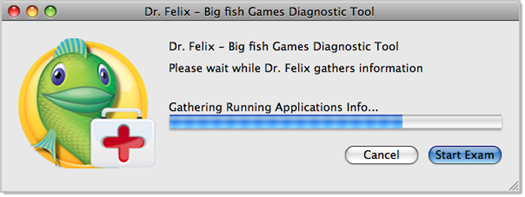
- When Dr. Felix is finished, click the Close button.
-
A .zip file named DrFelixResults will be created and saved to your desktop.

- Attach the DrFelixResults.zip file in a reply to your Customer Support email. For assistance with attaching a file, please see the Attach a File to Your Email help article.
How Do I Attach My Results?
Please click HERE for instructions on how to attach a file to your email.
What Kind of Information Does Dr. Felix Collect From My Computer?
Dr. Felix collects only routine diagnostics information that is helpful in addressing technical problems. This information includes:
- A Windows DxDiag report, which provides information about the computer's hardware.
- Big Fish Games app (Game Manager) error logs.
- Trace routes, which test the connection between your system and our servers. This helps troubleshoot connectivity problems.
- A list of running processes, which help determine if other programs may be interfering with games or downloads.
As Dr. Felix gathers the necessary data, it will list every source that it checks. See the first Dr. Felix screenshot in this article for an example of this process.